
Set up custom content request offers
Last updated: 2026-07-13
Offers are the paid "products" fans can order from your profile — for example a personalised shoutout or a custom photo set.
- Go to Requests → Manage Offers.
- Click Add Offer to create a new one.
- Use the toggle to activate or deactivate any offer.
- Use Edit to change an existing offer's details, or Remove to delete it entirely.
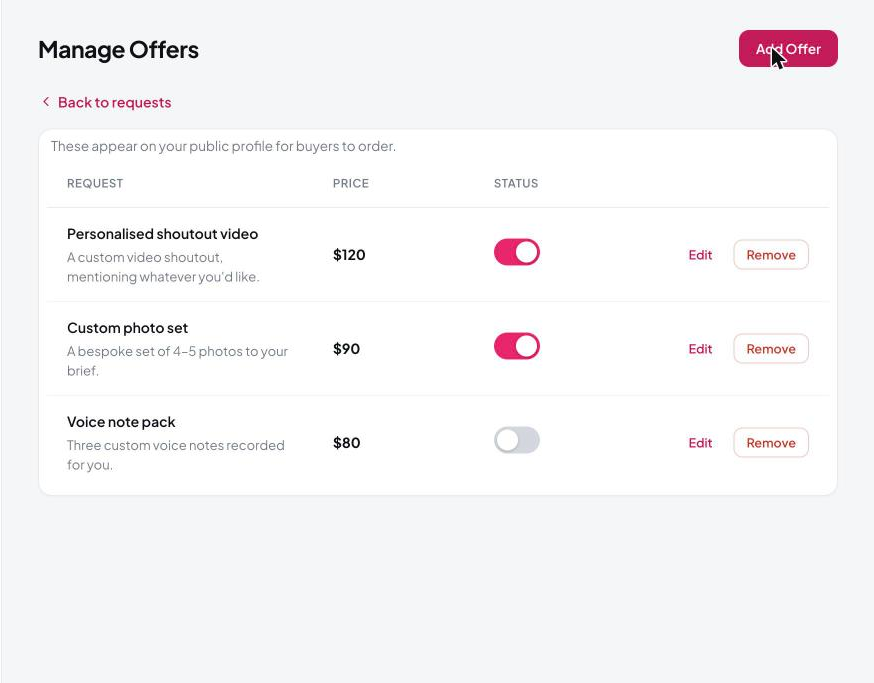
Only active offers appear on your public profile for fans to order.
Remove is permanent. Toggling an offer off just hides it and keeps its setup; Remove deletes it completely. Toggle off if you only want to pause it.
Still need help?
Our support team is happy to assist.